

How to blend objects along a path in CorelDRAW 12
Blending objects in CorelDRAW 12 lets you add realistic depth to your drawings and create interesting transition effects.
Did you know that you can use the Interactive blend tool to blend objects along a path in one easy step? You can blend objects along a straight or freehand path.
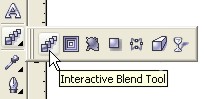
The Interactive blend tool is located on the Interactive tools flyout in the toolbox.
To blend objects along a straight path, select the first object with the Interactive blend tool, and then drag to the second object.

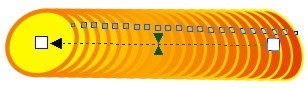
A blend along a straight path
To blend objects along a freehand path, select the first object with the Interactive blend tool, and while holding down Alt, draw a freehand path to the second object.

A blend along a freehand path
Most read
- Triple EDP award win for Mimaki
- New HP Printer series for busy enterprise environments
- HP Inc. and manroland Goss sign reseller agreement for Digital Finishing Systems
- Fujifilm to cease sales of Acuity Prime and Acuity Ultra products
- Spicers announces plans to acquire Spandex Australia
- New MD for Fujifilm Business Innovation Australia